You have a Microsoft 365 subscription.
You plan to enroll devices in Microsoft Intune. You need to meet the following requirements:
• Only allow the enrollment of devices that have a specific international mobile equipment identifier (IMEI).
• Support the enrollment and management of up to 1,000 devices
Which enrollment setting should you configure for each requirement? To answer, drag the appropriate settings to the correct requirements. Each setting may be used once, more than once, or not at all. You may need to drag the split bar between panes or scroll to view content.
NOTE: Each correct selection is worth one point.
 devices
You have a Microsoft 365 subscription that has Windows 365 Enterprise licenses.
You plan to use a custom Windows 11 image as a template for Cloud PCs.
You have a Hyper-V virtual machine that runs Windows 11 and has the following configurations:
• Name: VM1
• Disk size: 64 GB
• Disk format: VHDX
• Disk type: Fixed size
• Generation: Generation 2
You need to ensure that you can use VM1 as a source for the custom image. What should you do on VM1 first?
You have a Microsoft 365 subscription and use Microsoft Intune.
You have the Endpoint Privilege Management (EPM) elevation settings policy shown in the following exhibit.

No EPM elevation rules policies are configured.
Use the drop-down menus to select the answer choice that completes each statement based on the information presented in the graphic.
NOTE: Each correct selection is worth one point.

You have an Azure AD tenant and 100 Windows 10 devices that are Azure AD joined and managed by using Microsoft Intune.
You need to configure Microsoft Defender Firewall and Microsoft Defender Antivirus on the devices. The solution must minimize administrative effort.
Which two actions should you perform? Each correct answer presents part of the solution.
NOTE: Each correct selection is worth one point.
You have a Microsoft 365 E5 tenant that contains Windows devices enrolled in Microsoft Intune as shown in the following table.

You create an Endpoint Privilege Management (EPM) elevation settings policy named ElevationSettmgsl that has the following settings:
• Endpoint Privilege Management: Enabled
o Default elevation response: Require user confirmation
o Validation: Business justification
• Assignments: Group1 Each device contains a file named File1.exe that can be run only by an administrator. You create an EPM elevation rules policy named ElevattonRules1 that has the following settings:
• Rule name: Rule1
o Elevation type: Automatic
o File name: Filel.exe
o File hash: < Filel.exe hash >
• Assignments: Group2
For each of the following statements, select Yes if the statement is true. Otherwise, select
NOTE: Each correct selection is worth one point.

You have a Microsoft Intune subscription.
You are creating a Windows Autopilot deployment profile named Profile1 as shown in the following exhibit.

Use the drop-down menus to select the answer choice that completes each statement based on the information presented in the graphic.
NOTE: Each correct selection is worth one point.

You have groups that use the Dynamic Device membership type as shown in the following table.

You are deploying Microsoft 365 apps.
You have devices enrolled in Microsoft Intune as shown in the following table.

In the Microsoft Endpoint Manager admin center, you create a Microsoft 365 Apps app as shown in the exhibit. (Click the Exhibit tab.)

For each of the following statements, select Yes if the statement is true. Otherwise, select No.
NOTE: Each correct selection is worth one point.

You have a Microsoft Deployment Toolkit (MDT) deployment share named DS1.
in the Out-of-Box Drivers node, you create folders that contain drivers for different hardware models.
You need to configure the Inject Drivers MDT task to use PnP detection to install the drivers for one of the hardware models.
What should you do first?
You have a Microsoft 365 subscription that contains 5,000 Windows devices enrolled in Microsoft Intune.
You plan to use the Sync and Collect diagnostics bulk device actions.
What is the maximum number of devices you can include in each action? To answer, select the appropriate options in the answer area.
NOTE: Each correct selection is worth one point.

You have a Microsoft 365 E5 subscription that includes Microsoft Intune.
You need to configure a compliance policy for the iOS/iPadOS platform. The solution must meet the following requirements:
• Require jailbroken devices to be marked as noncompliant.
• Mark devices without a password lock as noncompliant.
Which compliance policy settings should you configure for each requirement? To answer, select the appropriate options in the answer area.
NOTE: Each correct selection is worth one point.

You have a Microsoft 365 E5 subscription.
You create a new update rings policy named Policy1 as shown in the following exhibit.

Use the drop-down menus to select the answer choice that completes each statement based on the information presented in the graphic.
NOTE: Each correct selection is worth one point,

You have devices enrolled in Microsoft Intune as shown in the following table.

Intune includes the device compliance policies shown in the following table.

The device compliance policies have the assignments shown in the following table.

For each of the following statements, select Yes if the statement is true. Otherwise, select No. NOTE: Each correct selection is worth one point.

You have an Azure AD group named Group1. Group! contains two Windows 10 Enterprise devices named Device1 and Device2. You create a device configuration profile named Profile1. You assign Profile! to Group1. You need to ensure that Profile! applies to Device1 only. What should you modify in Profile 1?
In Microsoft Intune, you have the device compliance policies shown in the following table.
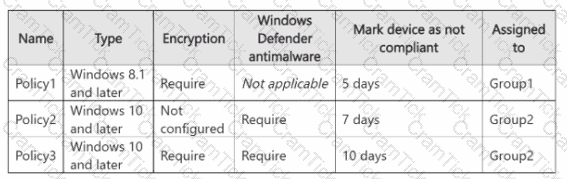
The Intune compliance policy settings are configured as shown in the following exhibit.
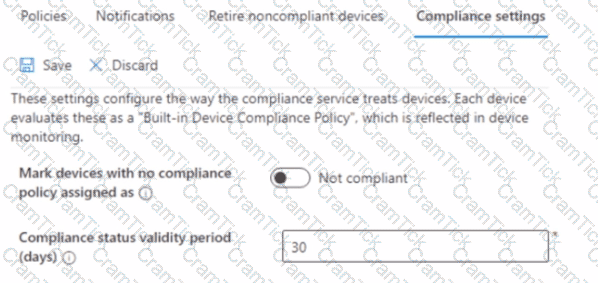
On June 1, you enroll Windows 11 devices in Intune as shown in the following table.

For each of the following statements, select Yes if the statement is true. Otherwise, select No.
NOTE: Each correct selection is worth one point

You have a Microsoft 365 subscription that uses Microsoft Intune.
You need to ensure that you can deploy apps to Android Enterprise devices.
What should you do first?
You have a Microsoft 365 subscription that includes Microsoft Intune.
You need to deploy a custom app to Android devices. The app uses the APK file format.
Which type of app should you select for the deployment?
Note: This question is part of a series of questions that present the same scenario. Each question in the series contains a unique solution that might meet the stated goals. Some question sets might have more than one correct solution, while others might not have a correct solution.
After you answer a question in this section, you will NOT be able to return to it. As a result, these questions will not appear in the review screen.
Your network contains an Active Directory domain. The domain contains a computer named Computer1 that runs Windows 8.1.
Computer1 has apps that are compatible with Windows 10.
You need to perform a Windows 10 in-place upgrade on Computer1.
Solution: You copy the Windows 10 installation media to a Microsoft Deployment Toolkit (MDT) deployment share. You create a task sequence, and then you run the MDT deployment wizard on Computer1.
Does this meet the goal?
You have an Azure AD tenant that contains the devices shown in the following table.

You purchase Windows 11 Enterprise E5 licenses.
Which devices can use Subscription Activation to upgrade to Windows 11 Enterprise?
You have devices enrolled in Microsoft Intune as shown in the following table.

On which devices can you apply app configuration policies?
You have a Windows 10 device named Device! that is joined to Active Directory and enrolled in Microsoft Intune.
Device1 is managed by using Group Policy and Intune.
You need to ensure that the Intune settings override the Group Policy settings.
What should you configure?
You have a Microsoft 365 E5 subscription and use Microsoft Intune.
You need to use a Sync bulk device action on all corporate-owned Windows devices.
What is the maximum number of devices you can include the action?
You are evaluating which devices are compliant.
For each of the following statements, select Yes if the statement is true. Otherwise, select No.
NOTE: Each correct selection is worth one point.

You have a Microsoft 365 E5 subscription and use Microsoft Intune Suite. You manage the following types of devices;
• Windows 11
• Android
• iOS
You need to implement Microsoft Tunnel for Mobile Application Management (MAM) to provide the devices with access to on-premises company apps.
What should you deploy first, and which device types can use Tunnel for MAM? To answer, select the appropriate options in the answer area.
NOTE: Each correct selection is worth one point.

You need to prepare for the deployment of the Phoenix office computers.
What should you do first?
You need to meet the technical requirements for Windows AutoPilot.
Which two settings should you configure from the Azure Active Directory blade? To answer, select the appropriate settings in the answer area.
NOTE: Each correct selection is worth one point.

You need to recommend a solution to meet the device management requirements.
What should you include in the recommendation? To answer, select the appropriate options in the answer area.
NOTE: Each correct selection is worth one point.

You need a new conditional access policy that has an assignment for Office 365 Exchange Online.
You need to configure the policy to meet the technical requirements for Group4.
Which two settings should you configure in the policy? To answer, select the appropriate settings in the answer area.
NOTE: Each correct selection is worth one point.

What is the maximum number of devices that User1 and User2 can enroll in Intune? To answer, select the appropriate options in the answer area.
NOTE: Each correct selection is worth one point.

You need to meet the requirements for the MKG department users.
What should you do?
You need to prepare for the deployment of the Phoenix office computers.
What should you do first?
For each of the following statements, select Yes if the statement is true. Otherwise, select No.
NOTE: Each correct selection is worth one point.

You need to meet the technical requirements for the IT department.
What should you do first?
For each of the following statements, select Yes if the statement is true. Otherwise, select No. NOTE: Each correct selection is worth one point.

User1 and User2 plan to use Sync your settings.
On which devices can the users use Sync your settings? To answer, select the appropriate options in the answer area.
NOTE: Each correct selection is worth one point.

Which devices are registered by using the Windows Autopilot deployment service?
You need to ensure that computer objects can be created as part of the Windows Autopilot deployment. The solution must meet the technical requirements.
To what should you grant the right to create the computer objects?
You need to resolve the performance issues in the Los Angeles office.
How should you configure the update settings? To answer, select the appropriate options in the answer area.
NOTE: Each correct selection is worth one point.

What should you upgrade before you can configure the environment to support co-management?
You need to meet the device management requirements for the developers.
What should you implement?
You implement the planned changes for Connection1 and Connection2
How many VPN connections will there be for User1 when the user signs in to Device 1 and Devke2? To answer select the appropriate options in the answer area.
NOTE; Each correct selection is worth one point.

For each of the following statements, select Yes if the statement is true. Otherwise, select No.
NOTE: Each correct selection is worth one point.

You implement Boundary1 based on the planned changes.
Which devices have a network boundary of 192.168.1.0/24 applied?
You need to meet the technical requirements for the new HR department computers.
How should you configure the provisioning package? To answer, select the appropriate options in the answer area.
NOTE: Each correct selection is worth one point.

You need to meet the OOBE requirements for Windows AutoPilot.
Which two settings should you configure from the Azure Active Directory blade? To answer, select the appropriate settings in the answer area.
NOTE: Each correct selection is worth one point.

You need to capture the required information for the sales department computers to meet the technical
requirements.
Which Windows PowerShell command should you run first?
What should you configure to meet the technical requirements for the Azure AD-joined computers?
You have computers that run Windows 10 and are managed by using Microsoft Intune.
Users store their files in a folder named D:\Folder1.
You need to ensure that only a trusted list of applications is granted write access to D:\Folder1.
What should you configure in the device configuration profile?
You have a Microsoft 365 subscription that contains the following devices enrolled in Microsoft Intune:
• A corporate-owned Windows device named Device1
• A personally-owned Android device named Device2
You need to use a remote action on each device.
The solution must meet the following requirements:
• Repurpose Device1 by returning the device to the factory default settings.
• Remove only corporate data from Device2 and remove the device from Intune when the device checks in.
Which remote action should you use on each device? To answer, drag the appropriate remote actions to the correct devices. Each remote action may be used once, more than once, or not at all. You may need to drag the split bar between panes or scroll to view content.
NOTE: Each correct selection is worth one point.


TESTED 21 May 2026